Data Deletion Instructions (User Data Guide)
At Bubble Game Studio, we respect your privacy and provide a transparent way to manage and delete your personal data. Below are the detailed steps to request data deletion.
Method 1: In-App Deletion (Recommended)
This is the fastest way to delete your data. This action will remove your local and server data immediately.
Step 1: Open Settings
Launch the game and tap the “Gear” icon (Settings) located in the top right corner of the home screen.

Step 2: Find the Delete Option
At the bottom of the Settings menu, look for the blue text link labeled “Delete Data”.
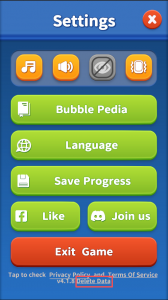
Step 3: Initial Confirmation
A pop-up will appear warning: “Deleting data will erase all progress. You cannot continue playing.” Tap “OK” to proceed.
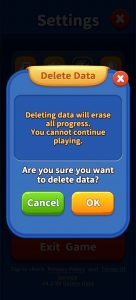
Step 4: Final Confirmation
A final warning will state: “This action cannot be undone. All progress will be lost.” Tap “OK” to confirm your choice.
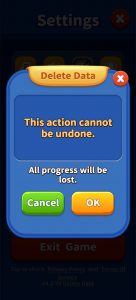
Step 5: Process Completion
You will see a “Deleting…” status. Once finished, all your data, including game progress and purchases, will be permanently erased.
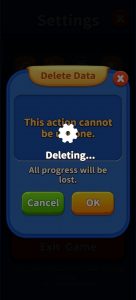
Method 2: Facebook Data Deletion
If you have linked your game to Facebook, you can also manage your data via Facebook’s “Apps and Websites” settings.
-
Log in to your Facebook account and go to Settings & Privacy > Settings.
-
Select Apps and Websites from the left-hand menu.
-
Find [Your Game Name] and click Remove.
-
In the pop-up, check the box that says “Send a request to [Your Game Name] to delete your data” and click Remove.
[Note: Facebook will automatically notify our servers to delete your data.]
Method 3: Email Support Request
If you have already uninstalled the app and cannot access the in-game settings, you may contact us directly.
-
Support Email: support@bubblegame.cc
-
Required Info: Please provide your Player ID (found at the bottom of the Settings menu) or the email address linked to your account.
-
Timeline: We will process your request and confirm the deletion within 30 days.
Important Notice:
-
Permanent Action: Data deletion is irreversible. You will lose all levels, coins, and items permanently.
-
Account Recovery: Once deleted, the account cannot be recovered. You must start from Level 1 if you choose to play again.